


Skip to content
ON THE TOOLS HQ
SOFTWARE COMPARISON

Powered Now vs ServiceM8: which fits your business?

Paperwork and tax tools, or shared team access? Compare the workflow, required plans, costs and limits before choosing.

Editorial updated 2026-11-19. Supplier source dates are listed below.

Paperwork and tax tools, or shared team access?

Powered Now is worth prioritising when job sheets, certificates and its UK accounting or tax tools are central to the process. ServiceM8 is worth prioritising when shared office-and-field access and the monthly job allowance are the main buying questions. Powered Now’s Business plan is single user, while Professional and Premium are per user. ServiceM8’s paid plans allow unlimited users, but the job allowance and form-creation scope still matter. The useful comparison is the complete plan for your team and paperwork. A cheap headline does not show whether the required certificate, custom form or accounting task is covered.

Powered Now logo
UK trade software combining quotes, invoices, job paperwork and built-in Making Tax Digital tools.
Powered Now product screenshot
Powered Now product imagery supplied by the vendor.
£28per month
ServiceM8 logo
Job management priced by new job cards, with unlimited users on paid UK plans and a free single-user option. Quote cards count towards the allowance.
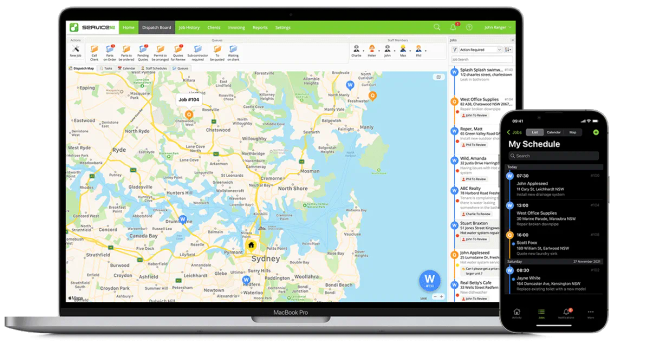
ServiceM8 product screenshot
ServiceM8 product imagery supplied by the vendor.
£0Free plan available

When to choose Powered Now

Consider Powered Now if UK job paperwork and the supplier’s accounting or tax tools are important to your process. Its single-user Business tier and per-user Professional/Premium tiers serve different buying situations. A sole trader should not assume that the entry price covers a growing team. Confirm the specific certificate and tax workflow you need, then compare that plan’s total monthly or annual cost.

When to choose ServiceM8

Consider ServiceM8 if several people need access but your monthly job volume is modest. Paid subscriptions allow unlimited users, so a shared office-and-field workflow does not automatically mean buying a seat for every person. The trade-off is the job allowance: check how your actual monthly workload fits. A solo operator can assess the free plan, but its single-user and job limits matter. Test advanced tasks on the phones your team uses before committing.

Compare the real subscription cost

Powered Now Business starts at GBP 28 per business per month. The published amount excludes VAT. ServiceM8 Free starts at GBP 0 per business per month. The published amount excludes VAT. Compare the plan that covers the work you need, including office and field users, any job allowance and extras. These starting figures do not establish the final bill for the same team or the same scope. Keep currencies and payment commitments separate.

The plan differences that can change the decision

Powered Now: Business has a diary; Premium adds drag-and-drop staff scheduling. Business has job sheets; Professional adds certificates and custom forms. The supplier lists built-in MTD for Income Tax; Professional adds VAT returns. ServiceM8: Recurring jobs are listed across the plans. Purchased forms work on all plans; custom form creation requires Growing or higher. Customers can choose a service, receive a quote and reserve a time. These distinctions are reasons to inspect the workflow during a trial or demo. An unverified item in the table means the checked evidence is incomplete, not that the product cannot perform that task. In particular, establish the exact certificate or accounting transaction needed rather than accepting a broad feature name.

Restrictions and buying questions

Powered Now: Monthly plans exclude VAT. Annual Business costs GBP 280; Professional GBP 320 per user; Premium GBP 400 per user, paid once each year. ServiceM8: The current UK pricing FAQ describes near-identical Android and iOS functionality. UK invoices use reverse-charge VAT treatment; confirm it with your accountant.

What to test before deciding

Create a job sheet or certificate using the exact format you need, then repeat the job with a second user. Check how the document reaches the customer and accounting records, and whether the plan being trialled matches the one being priced. Powered Now: No payment card required. ServiceM8: No payment card required; full feature access. Use a representative sample job rather than customer data you do not need for the test. Ask which trial or demonstration features remain in the plan being quoted, and record any manual steps or extras before deciding.

ServiceM8 phone and offline limits

Android supports almost all iOS functionality. Room Scan and augmented reality, diagrams, PDF editing/filling and some automatic camera tagging remain exceptions. Test the required tasks on the devices your team uses. Previously synced jobs and client details remain accessible offline; job updates, notes and photos sync later. Final PDF quotes, invoices and forms, and sending email or SMS, require a connection.

Compare the documented features

Accounting syncPowered NowIncluded

Xero and QuickBooks integrations are listed in Professional.

Supplier source
ServiceM8Included

Xero and QuickBooks Online are documented worldwide. MYOB Business integration is restricted to Australia and New Zealand.

Supplier source
Dispatch and GPSPowered NowIncluded

Professional adds staff location tracking and job routing.

Supplier source
ServiceM8Included

Dispatch Map shows live location/status for staff clocked on in the iOS app with GPS access. This should not be read as Android GPS parity.

Supplier source
InvoicingPowered NowIncluded

Invoices and payment links are included in Business.

Supplier source
ServiceM8Included

Invoices and mobile payments are included.

Supplier source
Job sheets and certificatesPowered NowIncluded

Business has job sheets; Professional adds certificates and custom forms.

Supplier source
ServiceM8Partial

Purchased forms work on all plans; custom form creation requires Growing or higher.

Supplier source
Making Tax Digital supportPowered NowIncluded

The supplier lists built-in MTD for Income Tax; Professional adds VAT returns.

Supplier source
ServiceM8Unverified

Offline modePowered NowIncluded

The supplier documents offline quoting and invoicing with later sync.

Supplier source
ServiceM8Included

Previously synced jobs and client details remain accessible offline; job updates, notes and photos sync later. Final PDF quotes, invoices and forms, and sending email or SMS, require a connection.

Supplier source
Online bookingPowered NowPartial

Premium customers can request a date and AM/PM slot through the portal. The request initially appears as Unplanned for the Day; staff allocate the exact diary time and trigger confirmation.

Supplier source
ServiceM8Included

Customers can choose a service, receive a quote and reserve a time.

Supplier source
QuotingPowered NowIncluded

Quotes and estimates are included in Business.

Supplier source
ServiceM8Included

Quotes include materials and labour.

Supplier source
Recurring jobsPowered NowIncluded

The diary supports recurring appointments across days, weeks or months. This verifies repeating appointments; it does not promise automatic contract/job generation for every recurring workflow.

Supplier source
ServiceM8Included

Recurring jobs are listed across the plans.

Supplier source
SchedulingPowered NowIncluded

Business has a diary; Premium adds drag-and-drop staff scheduling.

Supplier source
ServiceM8Included

Jobs can be scheduled to staff.

Supplier source

See the wider shortlist

All job management software
Sources and date checked (8)

Supplier documentation. Product imagery belongs to the respective supplier.