

Skip to content
ON THE TOOLS HQ
SOFTWARE COMPARISON

Fergus vs Powered Now: which fits your business?

Estimating and job costs, or UK paperwork? Compare the workflow, required plans, costs and limits before choosing.

Editorial updated 2026-11-19. Supplier source dates are listed below.

Estimating and job costs, or UK paperwork?

Fergus deserves a closer look when estimating and understanding job costs are the main reason for changing software. Powered Now deserves a closer look when UK job paperwork and the supplier’s accounting or tax workflow are the main requirements. These priorities overlap, so start by deciding which task currently creates the most manual work. Fergus has separate full-user and timesheet-user pricing. Powered Now has a single-user Business plan, while Professional and Premium are priced per user. A useful comparison therefore needs the right roles and plan, not simply the two lowest advertised amounts. Fergus figures use standard subscription prices before temporary introductory discounts. Check the current offer and eligibility with Fergus.

Fergus logo
Trade job management combining estimates, job costs and accounting integrations, with monthly full-user and timesheet-user options.
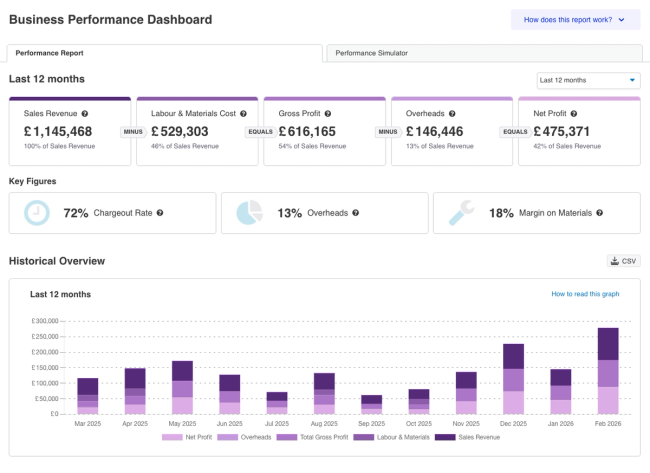
Fergus product screenshot
Fergus product imagery supplied by the vendor.
£39per user / month
Powered Now logo
UK trade software combining quotes, invoices, job paperwork and built-in Making Tax Digital tools.
Powered Now product screenshot
Powered Now product imagery supplied by the vendor.
£28per month

When to choose Fergus

Consider Fergus if estimating and understanding job costs are central to the way you run work. Its pricing distinguishes full users from timesheet users, so decide who needs to manage quotes and invoices and who only needs to record time. The advertised full-user prices are “from” figures. Ask for the complete configuration rather than multiplying a headline amount and assuming every role or feature is covered.

When to choose Powered Now

Consider Powered Now if UK job paperwork and the supplier’s accounting or tax tools are important to your process. Its single-user Business tier and per-user Professional/Premium tiers serve different buying situations. A sole trader should not assume that the entry price covers a growing team. Confirm the specific certificate and tax workflow you need, then compare that plan’s total monthly or annual cost.

Compare the real subscription cost

Fergus Essentials (from) starts at GBP 39 per user per month. VAT treatment is not established in the checked price record. Powered Now Business starts at GBP 28 per business per month. The published amount excludes VAT. Compare the plan that covers the work you need, including office and field users, any job allowance and extras. These starting figures do not establish the final bill for the same team or the same scope. Keep currencies and payment commitments separate.

The plan differences that can change the decision

Fergus: Estimates support reusable material and labour combinations. Invoicing and job-cost tracking are documented. Invoices and contacts sync with Xero. Powered Now: Business has a diary; Premium adds drag-and-drop staff scheduling. Business has job sheets; Professional adds certificates and custom forms. The supplier lists built-in MTD for Income Tax; Professional adds VAT returns. These distinctions are reasons to inspect the workflow during a trial or demo. An unverified item in the table means the checked evidence is incomplete, not that the product cannot perform that task. In particular, establish the exact certificate or accounting transaction needed rather than accepting a broad feature name.

Restrictions and buying questions

Fergus: Full users are billed monthly. Timesheet-only users start at GBP 12 per month. Larger teams can request a custom plan. Confirm VAT and the final number of full licences. Powered Now: Monthly plans exclude VAT. Annual Business costs GBP 280; Professional GBP 320 per user; Premium GBP 400 per user, paid once each year.

What to test before deciding

Take an estimate with labour and materials, plus the certificate or job sheet you need to issue. In Powered Now, confirm which tier includes that exact paperwork. In Fergus, follow the actual cost back to the estimate. Fergus: No payment card required. Powered Now: No payment card required. Use a representative sample job rather than customer data you do not need for the test. Ask which trial or demonstration features remain in the plan being quoted, and record any manual steps or extras before deciding.

Fergus recurring work and certificates

Both main plans list recurring jobs. UK certificates are available as a free add-on, but contractor users cannot complete them. Check the precise certificate type, version and user permissions during your trial.

Compare the documented features

Accounting syncFergusIncluded

Invoices and contacts sync with Xero.

Supplier source
Powered NowIncluded

Xero and QuickBooks integrations are listed in Professional.

Supplier source
Dispatch and GPSFergusIncluded

Employee Map/GPS tracking is documented as a Professional feature. Each user must enable location permissions; updates depend on app/device settings.

Supplier source
Powered NowIncluded

Professional adds staff location tracking and job routing.

Supplier source
InvoicingFergusIncluded

Invoicing and job-cost tracking are documented.

Supplier source
Powered NowIncluded

Invoices and payment links are included in Business.

Supplier source
Job sheets and certificatesFergusIncluded

UK certificates are available as a free add-on, with gas, electrical, oil, FGAS and PAT documents listed. Contractor users cannot use certificates. Confirm the exact current form and version required for your work.

Supplier source
Powered NowIncluded

Business has job sheets; Professional adds certificates and custom forms.

Supplier source
Making Tax Digital supportFergusUnverified

Powered NowIncluded

The supplier lists built-in MTD for Income Tax; Professional adds VAT returns.

Supplier source
Offline modeFergusIncluded

Fergus Go's 2026 release notes confirm offline time entries, photos and job notes, queued for automatic sync on reconnection. Previously loaded data can be viewed offline; this does not establish that every workflow works offline.

Supplier source
Powered NowIncluded

The supplier documents offline quoting and invoicing with later sync.

Supplier source
Online bookingFergusPartial

The documented web contact form captures work enquiries, contact details and photos, which staff convert to jobs. Customer selection of available appointment slots is not established.

Supplier source
Powered NowPartial

Premium customers can request a date and AM/PM slot through the portal. The request initially appears as Unplanned for the Day; staff allocate the exact diary time and trigger confirmation.

Supplier source
QuotingFergusIncluded

Estimates support reusable material and labour combinations.

Supplier source
Powered NowIncluded

Quotes and estimates are included in Business.

Supplier source
Recurring jobsFergusIncluded

Essentials and Professional list recurring jobs. Recurring templates can create and assign repeat work for the same site and billing customer.

Supplier source
Powered NowIncluded

The diary supports recurring appointments across days, weeks or months. This verifies repeating appointments; it does not promise automatic contract/job generation for every recurring workflow.

Supplier source
SchedulingFergusIncluded

Scheduling is part of the job-management workflow.

Supplier source
Powered NowIncluded

Business has a diary; Premium adds drag-and-drop staff scheduling.

Supplier source

See the wider shortlist

All job management software
Sources and date checked (9)

Supplier documentation. Product imagery belongs to the respective supplier.